Hi, I'm hakairyuousinn (my X account).
I get sound effects for my games in one of two ways. Either the code synthesizes the sound on the spot, or I pick a free sound effect, even out the volume, and drop it in. My first game, the digging game "Dig It!", is all synthesized. There isn't a single audio file in it. My newer games use recorded sounds for the big moments.
In both cases AI wrote the code. My job is to listen and say "hmm, that's not it."
Every sound in Dig It! is synthesized with Web Audio
Browsers come with Web Audio, a built-in way to create and play sound. For Dig It!, the sound effects are a simple "beep" tone combined with "hiss" noise.
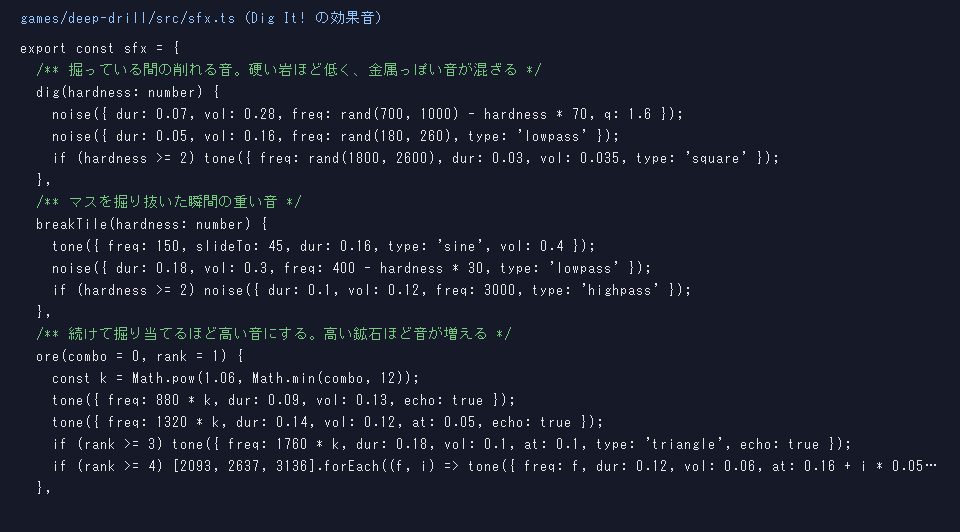
The grinding while you dig is 0.07 seconds of noise. The tone shifts a little on every dig. Harder rock sounds lower. On even harder rock, a short metallic click gets mixed in. When you hit ore, two notes play in a row, and if you keep finding ore one after another, they go a little higher each time.
Playing sound in a browser also takes a bit of setup:
- Browsers won't play sound until you touch the screen, so the audio gets ready on the first tap
- So that many sounds at once don't distort, loud peaks get squashed right before output
- Music and sound effect volumes can be changed separately on the settings screen
With synthesis there are no files to load, and making the sound change with rock hardness is just one more number.
For the big moments, I switched to recorded sounds
In "Abyss Gaze", a game about finding eyes in the dark, the climax sounded cheap with synthesized sound. So I used recordings from Sound Effect Lab (効果音ラボ), a free Japanese sound effect site.
Even with recordings, some sounds came out after I tried them. A "lightbulb moment" sound and a bell stuck out in the scary scenes, so I removed them. The sparkle when you find an eye was 2 seconds long and played so often it got way too loud, so I cut it down to the first 0.45 seconds.
Today I added more sounds to my library. Kenney, Retro 512, and Sonniss are free sound packs made for games, and together they come to 1,363 files. With the Sound Effect Lab sounds I already had, that's about 1,500.
I read the licenses before using them. Kenney and Retro 512 are CC0, so no credit needed. Sound Effect Lab allows use inside games without credit. But you can't hand out the audio files on their own, and they also ask that file names not give away what the sound is. So inside my games the files have numbered names like s01.mp3.
Steps for putting a sound file into a game
- Write down every moment that needs a sound: what happens at which second, and a word or two for the sound (rip, found it, and so on)
- Pick 2 or 3 candidates for each moment
- Even out the loudness of every sound with a tool called ffmpeg (-18 LUFS)
- Give them numbered names and put them in the game folder
- Listen in the game and remove the ones that don't fit
Choosing is the most work. AI can't hear sound, so it can only narrow candidates down by file name, length, and loudness. I make the final call by listening.
I used to type in the numbers of the sounds I wanted after listening, which was a small but real pain... Now I had AI make a listening page. I listen, press "use this," and paste the instructions it gives me to the AI. For scenes that shouldn't have any sound, I can pick "no sound."
What I fixed after hearing it in the game
In "Nightmare Customer Service", pressing a card played a sound, and the result sound played at the same time. Once I played it, I didn't want two sounds stacked. Now playing a card only plays the result sound. There are 12 kinds of cards, but only 3 sounds: right, wrong, and neither.
I also changed the sound for when a customer walks in. At first it was a "ting," meant to be a shop door bell, but you couldn't tell what it was. I switched it to a Japanese taiko drum "dong."
In the game I'm prototyping now, I used a "level up"-style sound for a reward and it sounded cheap. Sounds you hear all the time on Japanese variety shows seem to come across as a cue to laugh. I replaced it with a glockenspiel sparkle.
Dig It! still uses only synthesized sound. I wrote about my whole game-making process in "How to Make a Browser Game."
▶ Play Dig It! (synthesized sound only)
▶ Play Abyss Gaze (big moments use Sound Effect Lab)